
Barcode Scanner
Cognex CorporationLibraries & Demo
4.6959.00 Reviews
- Version
- 5.0.16 (218)
- Installs
- 1.00M
- Age Rating
- Everyone
Screenshots
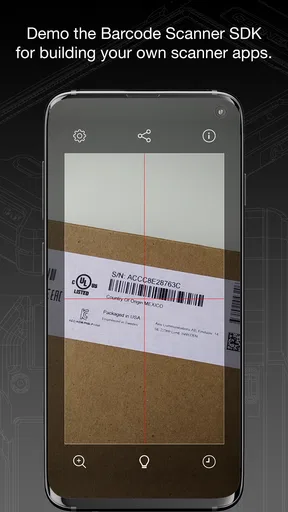
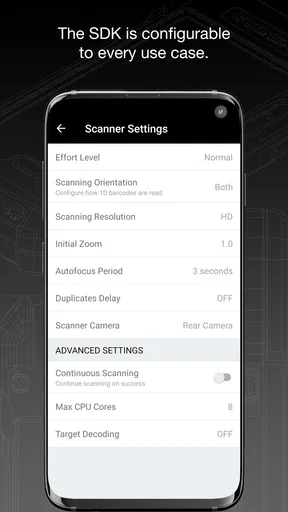
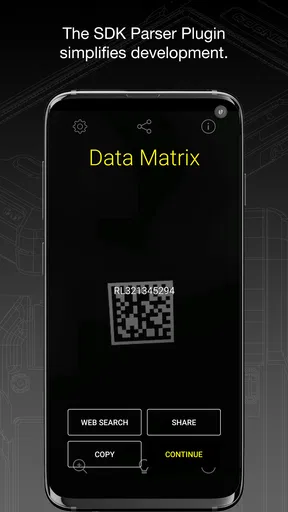
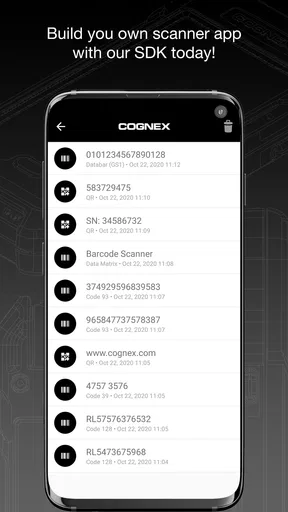
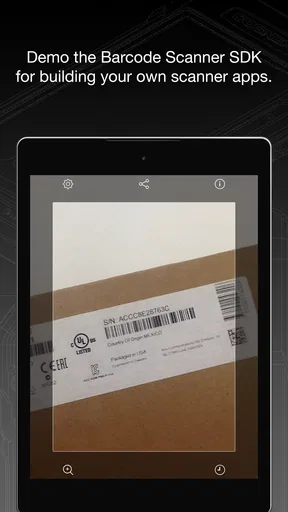
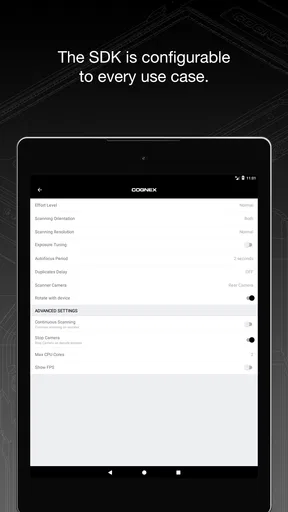
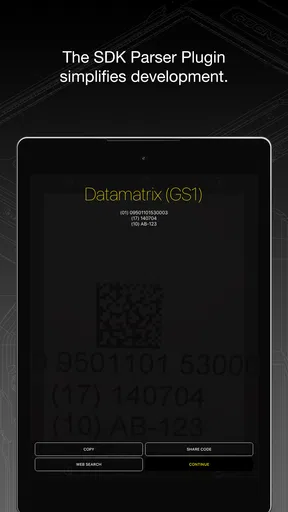
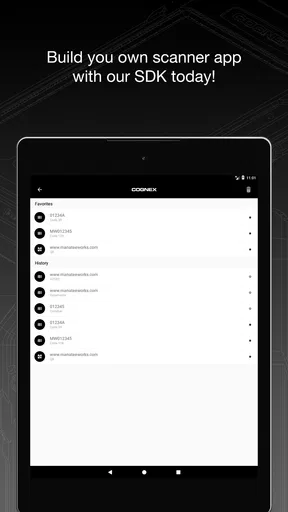
Our Review of Barcode Scanner
 Analysis by Appyee
I keep a barcode scanner on my phone for the small moments when a product label needs to become useful information quickly. In my experience, Barcode Scanner from Cognex Corporation is at its best when the job is simple: point the camera at a supported barcode, let the app read it, and move on. It is a free Android app in the Libraries & Demo category, with an Everyone age rating, so it feels approachable for a shared household device as well as for personal use.
That simplicity is the main reason I would recommend it to a friend. It does not ask me to build a shopping system, create a product database, or learn a complicated workflow before I can scan something. At the same time, that focused design means it should not be mistaken for a full inventory manager or a family shopping platform. The right question is not whether it does everything; it is whether a straightforward barcode-reading tool fits the way you and the people around you actually use a phone.
How it feels in an everyday shared-use scenario
A realistic example is a household trying to identify a box in a cupboard. One person may want to check an item while shopping, another may need to read a code from packaging, and someone else may simply be curious about a product. Passing around a phone with a dedicated scanner is less confusing than opening a general shopping app and navigating through several unrelated screens. I found that this narrow purpose makes the app easy to explain: open it, aim at the code, and wait for the reading.
That makes it useful on a shared device, but only within clear limits. The app is not a shared household account or a coordination hub. It does not turn one scan into a family task list, and I would not use it as a replacement for a jointly maintained pantry record. Its value is more immediate: it helps different people perform the same small action without needing separate training or a complicated setup.
The camera-based interaction also suits situations where the person holding the phone changes from one moment to the next. A partner can scan a package, hand the phone to a child for a supervised look, and return it without having to switch profiles or sign into a service. That convenience is practical, but it also means the household should agree on what happens after a scan. If the result leads to a website or another action, the person using the phone should understand what they are opening before continuing.
For a personal device, the experience is even more direct. I can use it for a quick check and close it without creating a long trail of household activity. For a shared phone, I would treat the scanner as a neutral utility rather than as a record of who did what. That distinction matters because the app’s strength is quick access, not detailed coordination between users.
What the focused design gets right
The strongest part of Barcode Scanner is the reduction of friction between seeing a barcode and attempting to read it. Many alternatives surround scanning with product discovery, deals, account features, or shopping suggestions. Those extras can be useful when I want a broader shopping workflow, but they can also slow down a simple task. Here, the category placement makes sense: it behaves like a practical demonstration and utility rather than a large retail destination.
I also appreciate that the app is free. That lowers the barrier for a household that only needs occasional scanning, especially when several people use the same Android phone. There is no reason to make a rare task part of a paid subscription decision when a compact tool can handle it. The app has been available since February 29, 2012, and its continued presence, along with a current version labeled 5.0.16 (218), gives it the feel of an established utility rather than a brand-new experiment.
Its audience is broad. The Everyone rating makes it suitable in age terms for ordinary household use, although an age rating should not be confused with a promise that every scanned result will be suitable for every person. A barcode can lead to information outside the scanner itself, so I still prefer an adult to guide younger users when the phone is shared or when a scan may open an unfamiliar destination.
Setting boundaries before several people use it
The most useful setup advice is to decide what role the app has before placing it on a shared device. If it is only for reading codes, tell everyone that it is a scanner, not a household catalog. That simple boundary prevents disappointment later. Someone expecting automatic stock tracking or a shared history may otherwise assume the app will remember more than it is designed to handle.
I would also keep the device owner’s normal privacy habits in place. A shared phone should have its own sensible screen lock and should not be handed over unlocked when the person using it does not need access to other apps. Barcode Scanner can be convenient without becoming the reason a household relaxes its general device boundaries. The scanner’s simplicity makes it easy to share physically, but it does not remove the need to supervise the phone itself.
Another practical boundary is lighting and positioning. A barcode is a visual target, so I get better results by holding the phone steady, filling enough of the camera view with the code, and moving away from glare on glossy packaging. This is not a special feature; it is a useful habit that avoids blaming the app for a difficult label. If a code is bent around a bottle, partly covered, very small, or printed with low contrast, I first straighten the item or change the angle before assuming the scan has failed.
That workflow is particularly important on a shared device because different users hold a phone differently. A confident adult may instinctively adjust distance and angle, while a first-time user may wave the camera over the package. Showing the person how to pause and frame the code is more helpful than repeatedly tapping the screen. In my experience, a short explanation of the physical technique does more for successful use than adding another app with a busier interface.
Coordinating scans without turning them into a system
Barcode Scanner works well as the first step in coordination. For example, one person can scan an item while another writes down the result or decides what to do next. That division is useful during shopping, sorting, or checking a collection of packaged goods. The scanner handles recognition; the household handles the decision-making. Keeping those jobs separate makes the process understandable and avoids expecting the app to become a shared database.
A small but important trade-off appears here: quick scanning does not automatically equal organized records. If several people scan items during the same errand, I would use a separate agreed method for noting the outcome, such as a household note or a conversation in the moment. The app is a good tool for identifying a code, but it should not be the only place where important coordination lives unless the household has independently established a reliable way to record it.
This is also where larger shopping apps may be a better fit. If your main goal is comparing prices, maintaining a recurring grocery list, or sharing purchases between accounts, a scanner-focused utility will feel incomplete. A retail app can connect scanning with product pages and shopping actions, while Barcode Scanner is more appealing when those surrounding features would be distractions. I prefer it when I want a clean starting point rather than a complete purchasing environment.
For a small business or a serious home inventory project, I would make the same distinction. A dedicated inventory solution may offer structured fields, user roles, synchronization, and reporting. Barcode Scanner should be chosen for the reading step, not because its name suggests a full stock-control system. That limitation is not a flaw when the task is occasional, but it becomes important as soon as several people need a consistent record of changes.
Age, trust, and what happens after the scan
The Everyone rating is reassuring for basic access, and the straightforward camera action is easier for many users than a feature-heavy shopping application. Still, I would not hand a shared phone to a young user with no explanation. The important lesson is that scanning is only the beginning. A result may contain information that needs context, and any next action should be checked by the person responsible for the device.
For children, I would make the rule simple: scan only household items or items an adult has approved, and ask before opening anything that appears after the reading. That is a trust habit rather than an app feature. It also works well for older relatives who may be comfortable with the camera but less comfortable judging unfamiliar screens. The app can reduce the technical difficulty of reading a code, but it cannot replace a family agreement about safe phone use.
Shared-device boundaries matter for adults too. If one person uses the phone for private work, banking, or messages, scanning should happen only when the device owner is comfortable with that access. A free utility with a broad age rating can be easy to pass around, yet the phone remains a personal device with other information on it. I see Barcode Scanner as suitable for supervised sharing, not as a reason to ignore account separation or ordinary privacy etiquette.
Trust also includes knowing when not to rely on a scan. If the printed label looks damaged or the result seems inconsistent with the item, I would verify it through the packaging or another trusted source rather than treating the first reading as unquestionable. A scanner can read a code accurately while the surrounding product assumption is wrong. That is a subtle but important distinction for households using the app to identify medicines, food, or anything where a mistaken interpretation could matter.
Where it stands beside familiar alternatives
The usual alternatives fall into two groups. The first group is built into shopping or retail services, where scanning is tied to product searches, prices, wish lists, or purchases. Those apps are better when I want the scan to feed directly into a larger shopping journey. Their drawback is that they can bring account steps and extra screens to a task that only needs a quick reading.
The second group includes broader scanner utilities that handle several document and code types. They may be more flexible if I regularly scan receipts, paperwork, or different visual formats. Barcode Scanner is the more sensible choice when I want a dedicated, uncomplicated barcode tool and do not need a general document scanner. Its narrower purpose can feel refreshing, but it also means I would not install it expecting an all-in-one camera toolbox.
For casual household use, the decision comes down to consistency. If everyone wants the same simple action and nobody needs a shared record, this app is easy to justify. If each scan must be assigned to a person, synchronized across devices, or connected to a purchase workflow, another category of app will serve the household better. I would rather make that choice clearly than judge this utility for not being a different kind of product.
The app’s reception supports its practical appeal: it holds a 4.5 average from around fifteen thousand ratings, with close to a thousand written reviews and over a million installs. Those figures suggest that many people find the basic concept useful, but they do not remove the need to consider your own workflow. A popular scanner can still be the wrong choice for someone who needs inventory management, advanced sharing, or a broader set of camera tools.
Small habits that make the experience better
My first tip is to scan before putting an item away when the code is clearly visible. Reaching for a package later, after it has been stacked behind other items, creates unnecessary friction. A second is to rotate cylindrical packaging until the code lies as flat as possible in the camera view. This often helps more than moving the phone rapidly from side to side.
For shared use, I would designate one predictable place for the phone during a scanning session. That avoids passing it through a crowded kitchen or leaving it unlocked on a counter. It also gives less confident users time to frame the code without feeling rushed. The app is quick enough for a handoff, but a calm physical setup makes the whole household workflow more reliable.
A third tip is to separate identification from action. Let the scanner read the code first, then pause and decide whether the result is relevant. This is especially useful when a child or guest is using the device, because it creates a natural checkpoint before another screen is opened. It also prevents the common mistake of assuming that every successful scan deserves an immediate purchase, download, or account action.
Finally, keep expectations realistic when a code will not read. Check glare, distance, focus, and whether the entire code is visible. Try the original packaging rather than a blurry photograph if possible. If the label is genuinely damaged, switching to a different scanner may not solve the underlying problem. In that situation, manual identification or checking the product information directly can be the more dependable route.
My household verdict
I see Barcode Scanner as a useful little tool for Android users who want barcode reading without turning a simple task into a shopping project. Cognex Corporation has kept the central experience focused, and the free price makes it easy to try on a personal or carefully shared device. Its Everyone rating also fits ordinary family access, provided adults remember that the phone and any follow-up content still deserve normal supervision.
I would recommend it to a household that needs occasional scanning for packaged items, quick identification, or a shared demonstration. I would skip it if the real requirement is synchronized inventory, account-based coordination, price tracking, or a complete shopping workflow. Those needs call for a more specialized alternative, not a harsher judgment of this app.
My final view is straightforward: Barcode Scanner is strongest when its boundaries stay clear. Use it as a fast reader, teach shared users how to frame difficult labels, and keep decisions and records in the household process that suits you. With that approach, its narrow design becomes an advantage rather than a limitation, and the app earns its place as a practical, low-commitment utility.
Privacy and Permissions
See what permissions an app requests and how it handles your data.
- Photos/Media/Files
- read the contents of your USB storage
- Storage
- read the contents of your USB storage
- Camera
- take pictures and videos
- Other
- full network access, control vibration
Verdict
Strengths of Barcode Scanner
- Scans common QR and barcode formats quickly.
- Useful for checking product details while shopping.
- Simple interface is easy for first-time users.
- Works well in bright conditions with a steady camera.
- Can save scanned results for later reference.
Limitations of Barcode Scanner
- Some products may have limited or missing online information.
- Camera access is required for scanning features.
- Low light can make scanning slower or unreliable.
- Results may vary depending on the barcode’s quality.
- Extra features or ads may differ by app version.
Similar Picks in This Category
View All
PGT: GFX, Launcher & Optimizer
Trilokia Inc.4.5

AusweisApp Bund
Governikus Service GmbH3.7

Cardboard
Google LLC3.2

Gamers GLTool with Game Tuner
Trilokia Inc.4.5

Multi Web Chat - Read Secretly
World Scan & Cleaner3.8

App Cloner Premium & Add-ons
App Listo1.9
Frequently Asked Questions
What is Barcode Scanner and what can it do?
Barcode Scanner is a utility app designed to read product barcodes and, depending on the format, QR codes using your device’s camera. After scanning, it may display product information, text, website links, contact details, or other encoded data. It is useful for quickly checking codes without needing a dedicated handheld scanner, although the information available can vary by barcode type and database support.
Does Barcode Scanner require an internet connection to work?
The camera-based scanning process can usually work without an internet connection because the app only needs to recognize the pattern printed in the code. However, an internet connection may be necessary when you want to open a website, search for product details, access online databases, or share scan results through cloud services. Offline functionality can therefore be limited to reading and displaying the encoded information.
Is Barcode Scanner safe to use and what permissions does it request?
The main permission normally required is access to the device’s camera, which is essential for scanning barcodes. Depending on the version and features, the app may also request permission to access the internet, save scan history, or share results. Before installing, review the permissions shown in the official app store and avoid scanning unknown links or entering sensitive information from untrusted codes.
Which types of barcodes can Barcode Scanner read?
Barcode Scanner may support common one-dimensional product formats such as UPC, EAN, and Code 128, as well as two-dimensional formats like QR codes, depending on the specific app version. Scanning performance can be affected by poor lighting, damaged printing, glare, unusual formats, or a barcode that is too small. Testing the code from different distances can improve recognition.
What should I do if Barcode Scanner cannot recognize a code?
If a scan fails, clean the camera lens, improve the lighting, and hold the phone steadily so the entire barcode fits inside the scanning area. Avoid reflections and try moving the device slightly closer or farther away. You should also check whether the code is damaged or supported by the app. If the problem continues, updating the app or trying another compatible scanner may help.
